
If you’re in the e-commerce game, you know that showcasing your products with clear, engaging videos can make all the difference. But what if you could elevate your product demos even more, without hiring voice actors or dealing with expensive studio setups? With CapCut’s AI voiceover tools, you can create polished, professional-sounding narrations for your videos in just a few clicks.
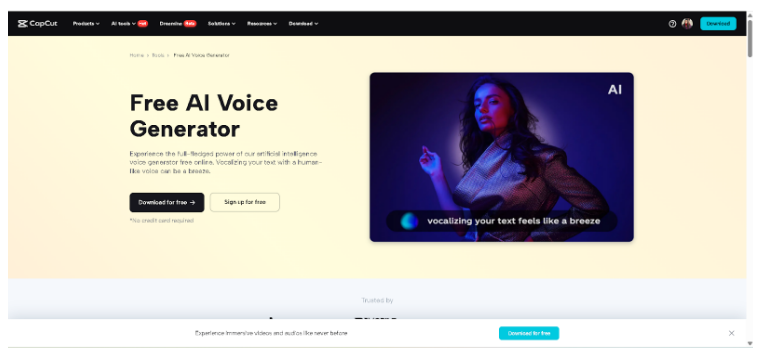
Whether you’re promoting gadgets, fashion, or home decor, incorporating AI voice generator into your e-commerce content adds a polished touch that effectively connects with customers. This article walks you through why voiceovers matter, the benefits of using CapCut’s AI, and a simple guide to bring your product videos to life.
Why Add Voiceovers to E-Commerce Demos?
Videos already speak louder than images, but voiceovers add an extra layer of communication. Here’s how:
-Boosts clarity: Voiceovers explain product features, sizing, and usage instructions better than captions alone.
-Builds trust: A natural-sounding narration can make your brand feel more relatable and credible.
-Increases conversions: Customers are more likely to take action when they understand what they’re buying.
-Makes videos inclusive: For viewers with visual impairments, voiceovers describe what’s happening visually.
Now that we know why voiceovers are important, let’s see how CapCut’s AI voiceover feature makes it all incredibly easy.
Why Use CapCut’s AI Voiceover Tool?
CapCut’s AI voiceover tool is built into the Desktop Video Editor, giving creators—especially small businesses and solopreneurs—a competitive edge without needing expensive resources.
Key Benefits:
-Text-to-speech conversion: Type your script, choose a voice, and the Text to Speech AI reads it for you.
-Multiple languages and accents: Perfect for global e-commerce targeting different markets.
-No mic needed: Save time and avoid bad-quality recordings.
-Sync with video timeline: Easily align your voiceover with visual actions and product highlights for seamless synchronization.
-Built-in editing tools: Adjust timing, add background music, enhance quality with AI Video Upscaler, and emphasize key moments.
How to Add Voiceovers in E-Commerce Product Demos Using CapCut AI
Now, you know the perks of AI voiceovers for e-commerce product demos. Here’s your simple guide to go from silent product footage to a professionally narrated demo.
Step 1: Import Your Product Demo and Open Text-to-Speech
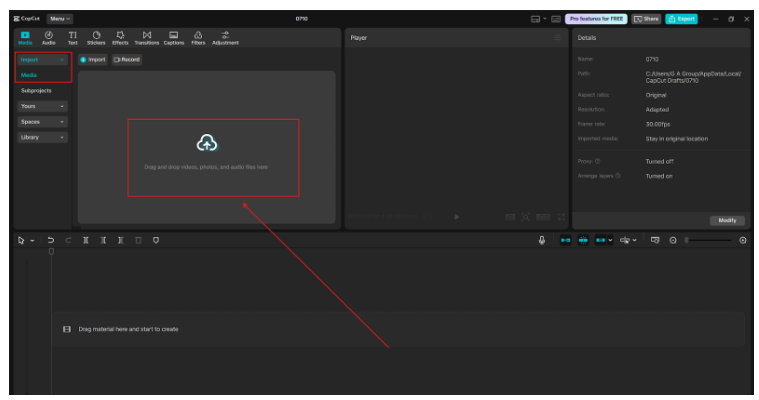
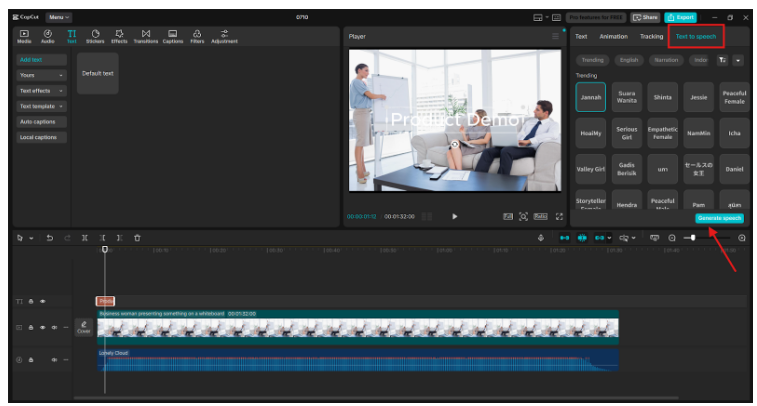
First, launch CapCut Desktop Video Editor and prepare your footage. Open CapCut Desktop Video Editor and click on “New Project”. Import your product demo video by dragging the file or selecting it from the media folder. Drop your video clip onto the timeline. Click “Text” on the left toolbar and select “Text to speech”. You can write your script in advance or use CapCut to help structure product highlights and selling points.
Step 2: Type Script & Choose AI Voice
Now it’s time to generate the voiceover. Type or paste your script into the text box. Example: “This 2-in-1 wireless charger is perfect for your phone and smartwatch. It supports fast charging and fits into any modern setup.” Select a language and choose a voice type (male/female, young/mature, upbeat/calm). Hit “Generate speech”. In a few seconds, CapCut creates a high-quality audio clip. You can preview it instantly and re-generate it with different voices until you find the right tone for your brand. Use a calm, confident voice for premium items, and a more upbeat tone for trendy or youth-targeted products.
Step 3: Sync & Finalize Your Voiceover
Once the voice is ready, it’s time to align it with your video. Drag the generated audio onto the timeline below your product demo clip. Play through the video and adjust the timing to match the product’s actions, gestures, or close-ups. Add finishing touches like:
-Subtitles (auto-generated from the voiceover)
-Background music (keep it low to not overpower the voice)
-Product callouts using animated text
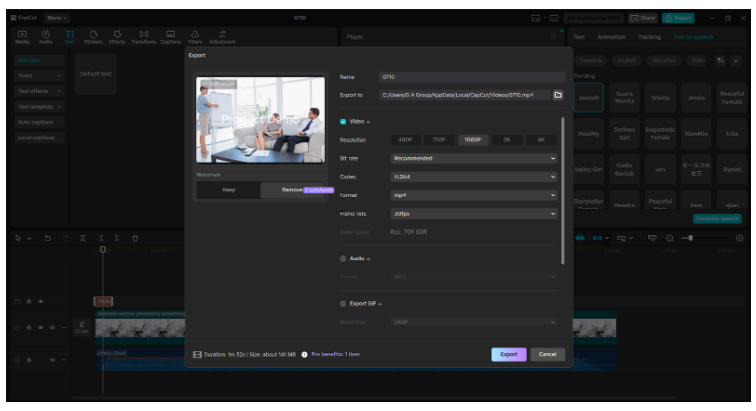
When you’re happy with the result, export the video in high resolution. Now you have a full-fledged product demo with voiceover narration ready for your website, Amazon listings, Instagram, or TikTok.
Example Use Cases for E-Commerce Voiceovers
Need inspiration? Here are some ways e-commerce sellers use CapCut AI voiceovers effectively:
-Unboxing videos: Add commentary as the product is revealed.
-How-to demos: Explain how to use or assemble a product.
-Feature highlights: Narrate key features while showcasing close-ups.
-Seasonal campaigns: Quickly produce holiday-themed promos with festive voices.
-Localization: Translate and voiceover the same video in multiple languages to reach broader audiences.
Conclusion
Adding AI voiceovers to your product demos used to sound like a job for big-budget brands. But with CapCut’s Desktop Video Editor and AI Voice Generator, it’s accessible to anyone. You don’t need voice actors, recording gear, or hours of editing. Just type, choose a voice, sync, and export.
Whether you sell handmade crafts, electronics, or digital products, adding narration makes your demos more understandable, professional, and trustworthy, leading to more views, longer watch time, and better sales.
So, why stick with silent clips or boring text overlays? Try CapCut’s AI voiceover tools today and give your e-commerce videos the voice they deserve.